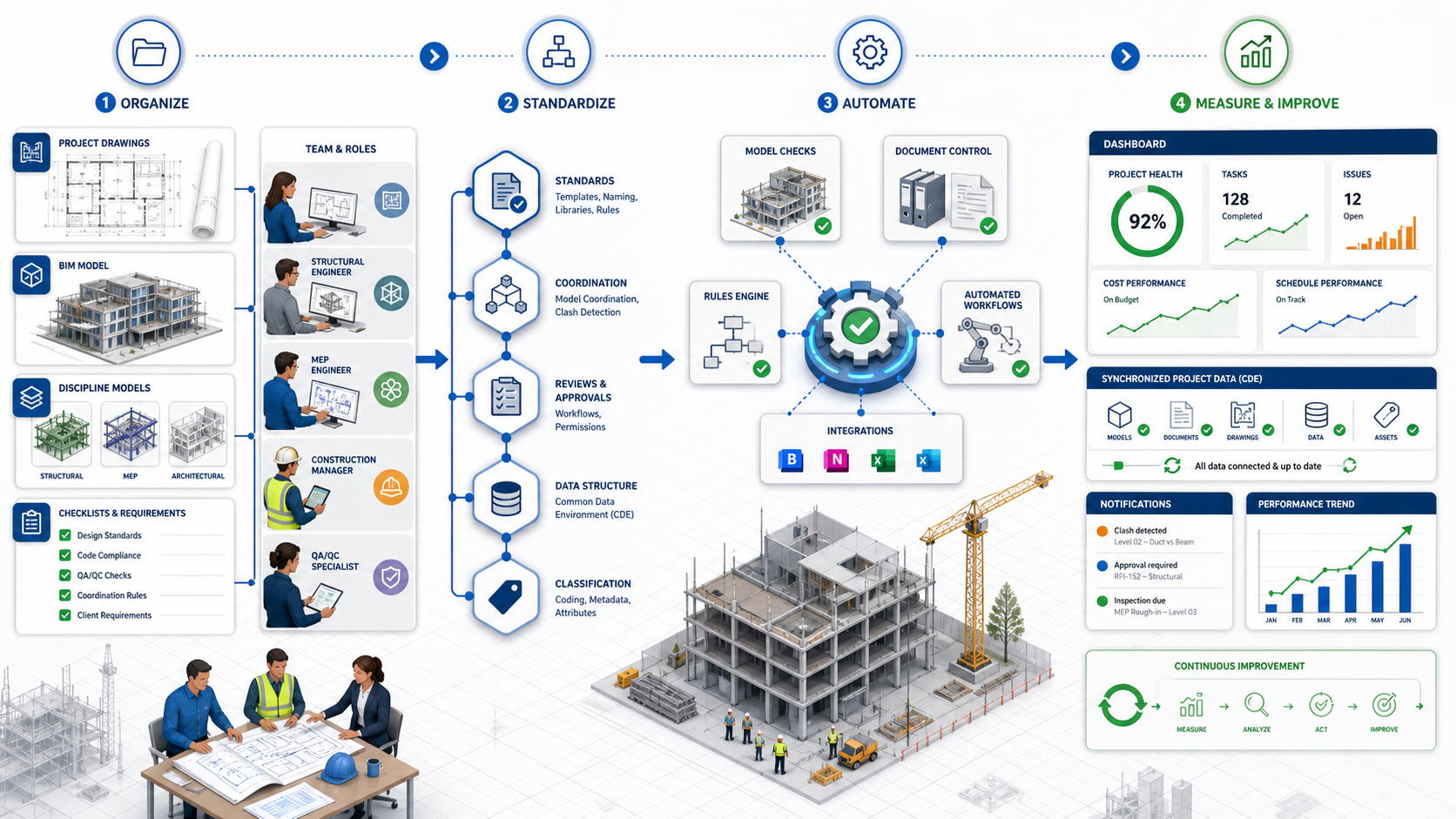
Why AEC Process Automation Should Start with Well-Defined Workflows
AEC automation starts with documented workflows, clear roles, standard data, and defined approval steps.

AEC firms are adopting more digital tools than ever before. Project teams use BIM platforms, project management systems, cloud storage, spreadsheets, dashboards, accounting tools, communication channels, and internal trackers to manage design and construction workflows.
However, having more software does not automatically create better processes.
In many cases, the real challenge is not the lack of technology. The challenge is that project information is scattered across disconnected platforms, responsibilities are not always clearly defined, and teams rely on manual workarounds to move data from one system to another.
That is why successful AEC process automation should not start with software. It should start with well-defined workflows.
Before connecting platforms, building dashboards, or automating repetitive tasks, AEC companies need to understand how their teams actually work, what information they use, who is responsible for each step, and what outcome each process is expected to produce.
Automation is powerful, but it is not magic. If the underlying process is unclear, automation can make the confusion faster, more visible, and harder to control.
Automation Does Not Fix a Broken Process
One of the most common mistakes in digital transformation is assuming that automation will solve operational disorder by itself.
It usually does not.
If a workflow is inconsistent, undocumented, or dependent on individual habits, automating it can create more problems than benefits. A poorly defined process may result in duplicated data, incorrect reports, missing approvals, unclear responsibilities, or unreliable dashboards.
A simple principle applies:
Automation does not fix a broken process; it scales it.
For example, if a project team does not have a consistent way to name projects, assign task statuses, approve deliverables, or organize files, an automation will inherit those inconsistencies. The result may be a faster process, but not necessarily a better one.
In the AEC industry, this risk is especially important because project workflows involve many moving parts: design teams, BIM coordination, engineering disciplines, project managers, clients, consultants, contractors, submittals, RFIs, issues, revisions, deadlines, and deliverables.
Why Workflow Definition Matters in AEC
AEC projects are complex by nature. They are collaborative, multidisciplinary, and highly dependent on accurate information.
A single project may involve architecture, structural engineering, MEP, civil design, BIM/VDC coordination, construction documentation, permitting support, and project administration. Each discipline may use different tools, file structures, naming conventions, approval procedures, and reporting methods.
Without a defined workflow, teams often depend on manual coordination. This may include copying information from one platform to another, updating spreadsheets by hand, downloading and renaming files, manually preparing weekly reports, or checking multiple systems to understand project status.
These manual steps may seem manageable at first. But as the number of projects, people, deliverables, and platforms increases, the process becomes harder to control.
Common Symptoms of Undefined Workflows
- Project data stored in multiple places.
- Different teams using different task statuses.
- Reports that depend on manual updates.
- Missing or incomplete information in project management tools.
- File structures that vary from project to project.
- Unclear ownership of approvals or deliverables.
- Dashboards that do not match the actual project status.
- Repetitive administrative work that consumes technical team capacity.
In this context, automation is not just a technical solution. It is an operational strategy. But to implement it correctly, the process must be clear first.
What a Well-Defined AEC Workflow Should Include
Before starting any automation or system integration, an AEC firm should be able to answer several basic questions about the process:
- What triggers the workflow?
- What information is required?
- Who is responsible for each step?
- Which platform stores the source data?
- What approvals are needed?
- What output should be produced?
- What exceptions can occur?
- How should success be measured?
A documented workflow does not need to be overly complicated. It simply needs to make the process visible, understandable, and repeatable.
1. Clear Process Trigger
Every workflow starts with a trigger. It may be a new project, a new task, a submitted form, a client request, a new issue in a BIM platform, a file uploaded to a folder, or a change in project status.
If the trigger is not clear, the automation may run too early, too late, or under the wrong conditions.
2. Defined Inputs and Outputs
Automation depends on data. Before integrating systems, the team must know what information enters the process and what result should be produced.
For example, if the goal is to generate a project dashboard, the workflow must define where the data comes from, which fields are required, how often they update, and what information should appear in the dashboard.
3. Responsible Roles
A workflow should define who owns each step. This does not always mean naming specific people. In many cases, it is better to define roles such as project manager, BIM coordinator, discipline lead, QA reviewer, administrator, or client contact.
This helps avoid ambiguity when automations send notifications, assign tasks, request approvals, or escalate pending actions.
4. Standardized Statuses and Naming Conventions
Many automation problems begin with inconsistent naming.
For example, one team may use “In Progress,” another may use “Ongoing,” and another may use “Active” to describe the same condition. To a person, those terms may look similar. To an automation, they may be completely different values.
The same issue appears with project names, task categories, file folders, deliverable codes, discipline names, and approval statuses.
Standardization is one of the most important steps before automation.
5. Approval and Validation Rules
AEC workflows often require reviews and approvals. Design packages, calculation reports, models, drawings, RFIs, submittals, and client deliverables may all need validation before moving forward.
A documented process should clarify what must be reviewed, who reviews it, what criteria must be met, and what happens if the item is rejected or requires changes.
6. Exception Handling
No project workflow is perfect. There will always be exceptions: missing information, delayed approvals, incorrect files, duplicated records, unusual client requests, or changes in scope.
Good automation planning identifies these exceptions before implementation. The goal is not to eliminate every possible variation. The goal is to decide how the workflow should respond when something does not follow the standard path.
Is Your AEC Workflow Ready for Automation?
Review the following items to evaluate your current workflow:
- The current workflow is documented.
- Responsibilities are clearly assigned.
- Input and output data fields are defined.
- Approval steps are standardized.
- Task and status names are consistent across platforms.
- There is a single source of truth for project information.
- Exceptions and edge cases are identified.
- Reporting requirements are clearly defined.
If only a few of these conditions are met, your team may need process mapping before implementing automation. If most are already in place, your workflow may be a strong candidate for automation and integration.
From Process Mapping to Automation
A strong automation initiative usually follows a simple sequence:
Map. Standardize. Automate. Measure. Improve.
This sequence helps prevent teams from jumping directly into technical implementation without understanding the business process.
Step 1: Map the Current Workflow
The first step is to document how the process works today. This includes the official procedure and the real-world workarounds that teams use to complete their tasks.
In many companies, the real process is not fully written anywhere. It exists in conversations, habits, spreadsheets, email threads, and individual experience.
Mapping the workflow makes that knowledge visible.
Step 2: Identify Gaps and Inefficiencies
Once the workflow is mapped, it becomes easier to identify unnecessary manual steps, duplicated data entry, unclear responsibilities, approval bottlenecks, and disconnected systems.
This step helps separate the real problem from the perceived problem.
Step 3: Standardize the Process
Before automation, the team should define common rules. These may include naming conventions, required fields, status values, folder structures, approval steps, and reporting criteria.
Standardization creates the foundation for reliable automation.
Step 4: Automate the Right Steps
Not every step should be automated.
The best candidates are repetitive, rule-based, data-driven, and low-risk tasks. Examples include sending notifications, creating tasks, updating dashboards, syncing records, organizing files, generating reports, or transferring data between platforms.
Human judgment should remain where technical review, design decisions, client coordination, or professional responsibility are required.
Step 5: Monitor and Improve
Automation should not be treated as a one-time setup. As projects, teams, tools, and client requirements evolve, workflows should be reviewed and improved.
A good automation strategy includes monitoring, maintenance, and continuous optimization.
What AEC Processes Can Be Automated or Integrated?
Once workflows are clearly defined, many AEC processes can benefit from automation and integration:
- Project setup and folder creation.
- Task creation from forms or templates.
- BIM issue tracking and reporting.
- Project status dashboards.
- Hours and budget tracking.
- Deliverable control.
- File organization and naming validation.
- QA/QC task workflows.
- Client reporting.
- RFI, submittal, or issue summaries.
- Notifications for overdue tasks.
- Data synchronization between project management platforms and dashboards.
- Integration between cloud storage, BIM platforms, spreadsheets, and business intelligence tools.
These automations can reduce repetitive work, improve visibility, and help teams make decisions based on more reliable information.
AEC Automation Requires Industry-Specific Understanding
AEC automation is different from generic business automation.
The workflows are technical. The data is project-based. The terminology matters. The structure of deliverables, disciplines, models, drawings, revisions, and approvals must be understood before creating a reliable solution.
A generic automation may move data from one platform to another. But an AEC-focused automation must understand the context of that data:
- What is the difference between a design issue and a construction issue?
- Which discipline owns a specific deliverable?
- When is a drawing package ready for QA?
- Which project phase does a task belong to?
- How should BIM data connect to project reporting?
- Which information should be visible to internal teams versus clients?
- How should hours, scope, and deliverables be related?
This is where industry knowledge becomes essential.
A successful automation partner should understand both sides of the equation: the technology and the AEC workflow.
The Goal: Connected Project Intelligence
The purpose of process automation is not simply to reduce clicks.
The larger goal is to create connected project intelligence.
This means that project information becomes easier to access, easier to trust, and easier to use for decision-making.
Instead of manually asking for updates, teams can rely on structured workflows and connected systems. Instead of preparing reports from scratch, dashboards can update from live or regularly synchronized data. Instead of searching through different platforms, project managers can access a clearer view of progress, workload, risks, and deliverables.
When workflows are well-defined and systems are properly integrated, AEC firms can move from fragmented information to coordinated operations.
How ECOSI Supports AEC Process Automation and Integration
ECOSI helps AEC companies improve the way their teams manage information, workflows, and digital tools.
Our approach begins with understanding the process before implementing the technology. We work with project teams to identify how information moves across platforms, where manual work is slowing down operations, and which workflows can be standardized, automated, or integrated.
Our support may include process discovery, workflow mapping, documentation of current and desired workflows, data structure definition, automation strategy, API-based integrations, low-code and no-code automation, project dashboards, reporting systems, and continuous workflow improvement.
Because ECOSI works directly in the Architecture, Engineering, and Construction industry, we understand that automation must align with real project delivery. Our team combines AEC knowledge with digital process improvement, helping companies create workflows that are practical, scalable, and easier to manage.
Final Thought
AEC firms do not need more disconnected tools. They need better-connected workflows.
Before starting an automation or integration initiative, the most important question is not:
Which software should we connect?
The better question is:
Is our process clear enough to automate?
When workflows are documented, responsibilities are defined, data is standardized, and exceptions are understood, automation becomes much more effective.
That is why AEC process automation should always start with well-defined workflows.
Ready to Automate Your AEC Workflows?
Start with a clear process map. ECOSI can help your team define, standardize, and connect your project operations with practical automation and integration solutions.